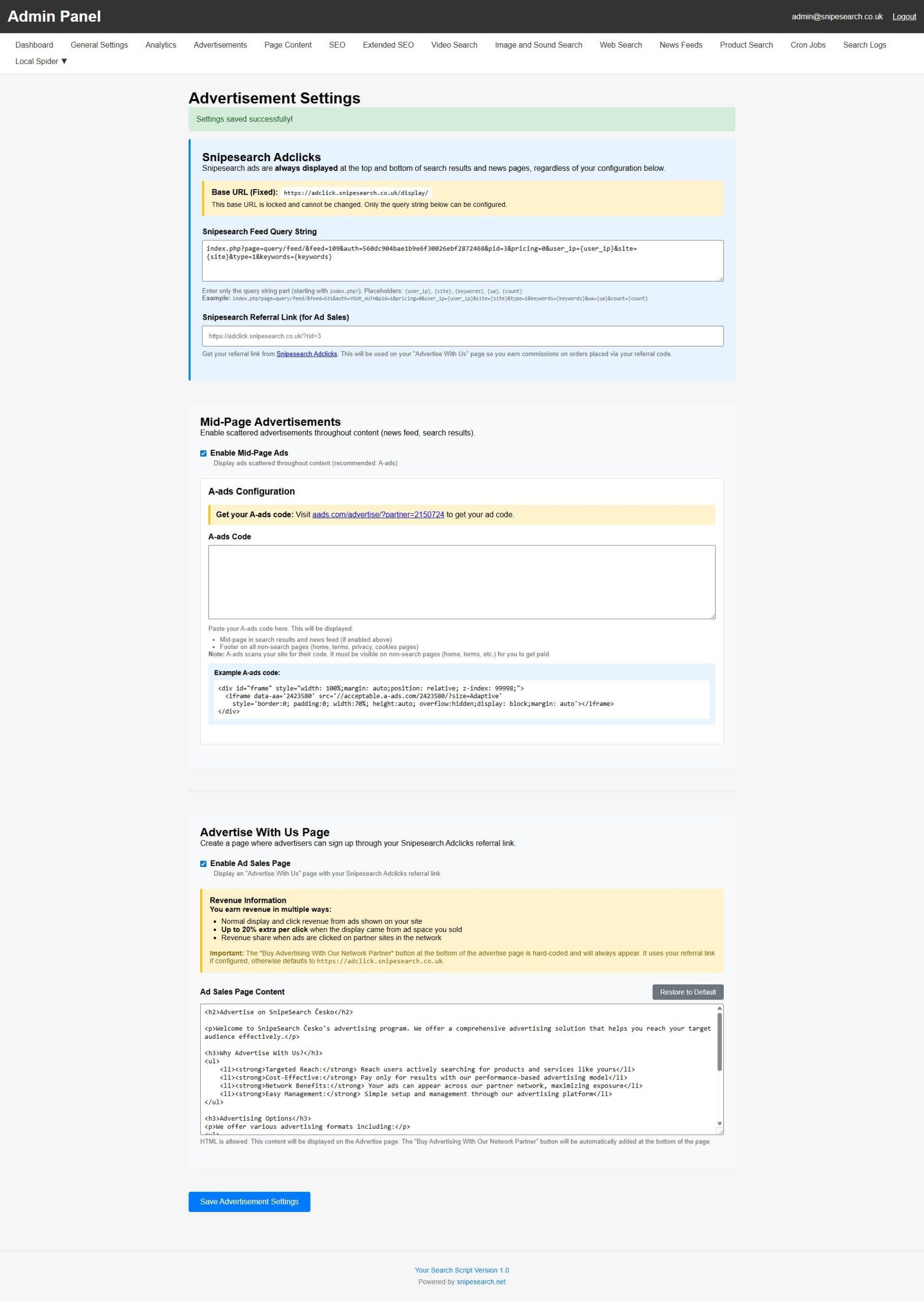
The Advertisements tab in the Admin Panel serves as your platform’s primary revenue command center, providing the essential tools to manage and activate multiple pre-approved income streams. From this centralized interface, you can configure the core Snipesearch Adclicks feed, deploy the A-ads network for mid-page monetization, and customize your public-facing Ad Sales Page to recruit direct advertisers. By mastering this tab, you transform your search engine from a simple utility into a fully automated, high-yield advertising resale asset.
Forget waiting weeks for AdSense approval or begging networks to accept your site. This script comes pre-approved for the Snipesearch Adclicks and A-ads networks. The moment you install the script, you are in the business of selling ad space. The system is hardcoded to display high-value ads at the top and bottom of every search result and news page. You aren’t just running a search engine; you are running a node in a massive, high-traffic advertising resale network.
The monetization is handled through a sophisticated Direct Feed Logic. By utilizing the adclicks.snipesearch.co.uk backbone, your site queries the network in real-time using specific user data like keywords and IP addresses to ensure the highest possible click-through rate. Because you are part of the Snipesearch ecosystem, you benefit from “Network Effect” pricing, earning revenue not just from your own traffic, but through resale bonuses and partner clicks across the entire network.
This is a Dual-Stream Income Model. First, you earn from the automated ad feeds that serve global brands. Second, you become an ad broker. The built-in “Advertise” page allows you to sell ad space directly to other businesses. If they sign up through your site, you get a 10% referral commission on their ad spend, plus an extra 20% bonus per click when those ads appear on your specific search engine. It’s a closed-loop profit system designed to scale as your site grows.
The Money Makers:
- Snipesearch Adclicks (Pre-Approved): The primary revenue driver. High-relevance ads injected directly into your search results via a secure, fixed API backbone.
- A-ads Integration: The gold standard for privacy-focused, anonymous advertising. Pre-approved and ready to monetize your traffic from minute one.
- The 10/20 Profit Loop Logic: This is the script’s most powerful economic feature, turning your site into an automated broker.
- The 10% Referral: (Passive Income) If a business clicks your “Buy Advertising” button and signs up, you receive a lifetime 10% commission on every dollar they spend across the entire network.
- The Extra Bonus: (Direct Revenue) When those same advertisers’ ads appear on your search engine, you earn your standard click revenue PLUS an additional bonus. The system recognizes your Referral ID and prioritizes your earnings.
- Zero-Maintenance Ads: The network handles the advertisers, the payments, and the tracking. You just provide the traffic and collect the checks.
- Scalable Resale Logic: As part of the network, your site can serve ads to—and earn from—partner sites, maximizing your exposure and earnings.
- The “Buy Advertising” Fail-Safe: The
/advertisepage is not just a static template. It features a hard-coded “Buy Advertising” button that automatically appends your unique referral ID (e.g.,/ref/YOUR_ID) to every link, ensuring you never miss a commission. - Network-Wide Ad Resale: As a node in the network, your site can serve ads to, and earn from, partner sites. This means you can profit from the global “Network Effect” even if your local traffic is just starting to grow.
- HTML-Ready Sales Editor: The built-in editor allows for full HTML customization of your “Pitch.” You can embed your own traffic charts, testimonial videos, or specific niche data to attract high-value direct advertisers.
To truly master the monetization of your search engine, you need to know how to manage the powerful background feeds that generate revenue from day one. Your Admin Panel is designed to act as a direct bridge to two pre-approved ad networks, ensuring you never have to wait for a third-party approval process to start earning.
🛠️ Step-by-Step: Administrating Your Ad Network
The Advertisements tab is where you turn on the “money faucet” by configuring your network credentials and display preferences.
1. Activating Snipesearch Adclicks
This is your primary revenue driver, serving ads at the top and bottom of every search and news page.
- Pasting the Feed Code: You don’t need to write code; you simply paste your unique Query String provided by Snipesearch into the dedicated field.
- Surgical Metadata Injection: Your search engine doesn’t just show random ads; it uses an intelligent injection system to maximize click-through rates (CTR).
- Placeholder Automation: The script automatically passes
{keywords},{user_ip}, and{user_agent}variables to the ad server. This ensures that a user searching for “Insurance” sees high-paying insurance ads, dramatically increasing your revenue per visitor. - Fixed-Position Monetization: The system is hardcoded to reserve the “Golden Slots”, the very top and very bottom of every search result page, for these high-value API-driven ads.
- Referral Earnings: Enter your Snipesearch Referral Link in the settings. This ensures that when other people see your search engine and decide to buy ads for themselves, you earn up to a 10% lifetime commission on their spending.
2. Activating the A-ads Feed
A-ads provides an additional layer of revenue through privacy-focused, “Mid-Page” advertisements that appear scattered throughout your search results and news feeds.
- Enabling Mid-Page Ads: First, toggle the “Enable Mid-Page Ads” switch to the ON position.
- Pasting the Script: Paste your A-ads iframe code into the A-ads Code box.
- Contextual Mid-Page Injection & Verification: The A-ads integration is designed to capture revenue from “scroll-heavy” users who look past the initial results.
- Automatic Footer Persistence: To satisfy network verification requirements, the script automatically injects the ad code into the footer of non-search pages. This ensures the A-ads crawler can always “see” your site, keeping your account active and verified for payouts.
- Zero-CSS Conflict: These ads are containerized to ensure they never break your site’s layout or interfere with the primary search results, maintaining a professional look while maximizing screen real estate.
- Validation Tip: A-ads requires their code to be visible on non-search pages to verify your site and ensure you get paid.
3. Turning on the Affiliate & Ad Sales Page
Your search engine doesn’t just show ads; it helps you sell them.
- The Toggle: Enable the “Ad Sales Page” in your settings to create a public
/advertisepage on your site. - Automatic “Buy” Buttons: The system automatically adds a hard-coded “Buy Advertising With Our Network Partner” button at the bottom of this page, linked to your referral ID.
- Customizing the Pitch: Use the built-in editor (HTML allowed) to rewrite the sales copy. You can explain your specific niche, highlight your traffic stats, and convince businesses why they should advertise on your search engine.
💰 The Multi-Threat Profit Model
By properly administrating these settings, you activate three distinct income streams simultaneously:
- Display Revenue: Direct earnings from every ad shown and clicked on your site.
- The 20% Bonus: Earn up to 20% extra per click when the ad display comes from ad space you specifically sold through your site.
- Network Share: Earn a share of the revenue when users click on partner ads across the wider Snipesearch network.
- Product Search Revenue: Don’t forget the “Hidden Stream.” In addition to standard ads, the Product Search vertical uses affiliate-ready data feeds. When users search for products, the system is designed to route them through monetized links, adding a fourth layer of potential income to your dashboard.
*additional revenue may also be earned in product search