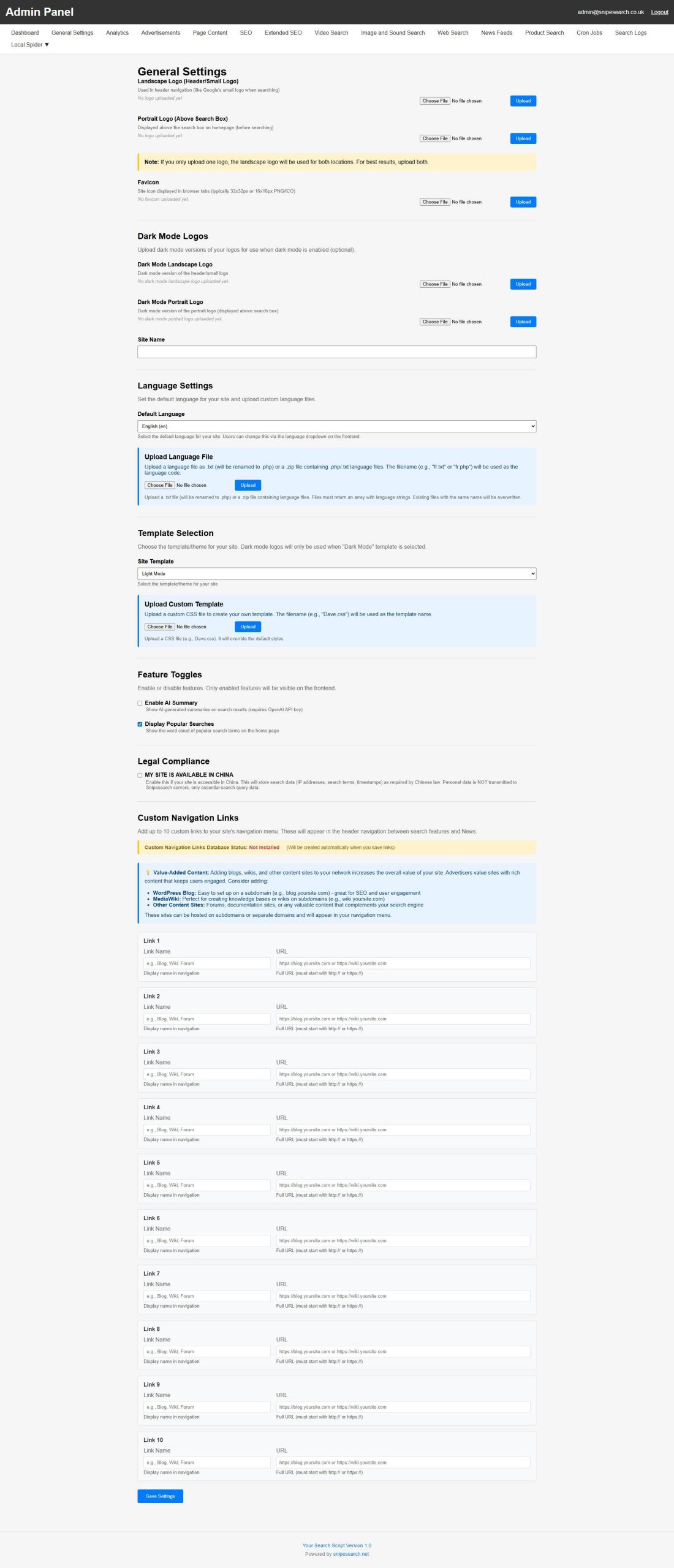
This guide provides a comprehensive overview of the General Settings tab within the Admin Panel. This section serves as the primary control center for the search engine, allowing you to manage everything from visual branding to advanced AI logic and international legal compliance.
🎨 Advanced Branding and Visual Customization
The General Settings allow for deep white-labeling to ensure your search engine looks professional across all devices and viewing modes:
- Manual Logo Management: The branding workflow is a granular, row-by-row process where every visual element must be chosen and uploaded individually to ensure the server correctly maps the file to its intended location.
- Primary (Light Mode) Logo: This slot is for your main brand image used when a light-themed template is active.
- Dark Mode Logos: These are separate manual tasks; you must upload inverted or color-adjusted versions specifically for dark-themed templates to ensure they remain visible against dark backgrounds.
- Mobile & Tablet Optimization: Upon a successful upload, the system automatically processes the logo to generate the necessary versions for mobile and tablet displays.
- Intelligent Logo Fallback: If you only upload one logo, the system will automatically use the landscape version for both locations to maintain site integrity.
- Dark Mode Optimization: To support modern user preferences, you can upload specific Dark Mode versions of both your landscape and portrait logos. These are automatically triggered when the “Dark Mode” template is selected.
- Custom Favicons: You can upload a site icon (PNG or ICO) that will appear in browser tabs, strengthening your brand’s presence in the user’s workspace.
- Identity Management: Easily update your Site Name, which the system uses to dynamically populate placeholders in legal notices and page content.
🌐 Global Reach and Regional Compliance
The platform is designed to operate internationally while adhering to specific local regulations:
- Professional Global Localization: Take your search engine to any market with a system designed for rapid demographic shifts without touching a single line of code.
- Bi-Directional Interface Support: Switch the entire frontend to Right-to-Left (RTL) mode with a single dropdown, fully supporting languages like Arabic and Hebrew.
- Global Language Library: Any language you upload is immediately available in the frontend selector, allowing your users to choose their own experience
- Failsafe Installation: The system uses a deliberate multi-save confirmation process to ensure your site never loads with broken terminology or empty labels
- China Internet Regulation Compliance: This unique feature allows you to toggle availability for the Chinese market. When enabled, the system automatically begins storing essential data, including IP addresses, search terms, and timestamps, to meet the requirements of the Cybersecurity Law and Personal Information Protection Law of the P.R.C..
- Customizable Legal Notices: The Admin Panel provides dedicated editors for both English and Chinese compliance notices, allowing you to clearly explain data collection practices to your users.
🤖 AI Summary and “Smart Learning” Logic
The “brain” of your search engine is managed through a sophisticated OpenAI integration that balances performance with cost-efficiency:
- OpenAI Configuration: By entering your OpenAI API Key, you unlock AI-generated summaries for search results. You can choose your preferred model, such as gpt-4o-mini, which is recommended for its cost-effectiveness.
- Tailored Output: You can set the approximate Summary Length between 500 and 1000 words. Longer summaries are ideal for sites focusing on detailed recipes, complex instructions, or technical explanations.
- Surgical Caching: To drastically reduce your API overhead, you can Enable AI Summary Caching. This ensures that once an AI summary is generated for a query, it is reused for future users. You can set the Cache Duration for up to 365 days, effectively serving thousands of users for the cost of a single API call.
- Exponential Profitability: By enabling AI Summary Caching, popular queries are answered instantly from your local
ai_summary_cachetable - Infinite Scaling: Serve thousands of unique visitors the same high-quality intelligence for the cost of one single API call, completely eliminating the “per-request” costs that bankrupt other platforms
- Connection Testing: A “Test Connection” button allows you to verify your API settings instantly before going live.
🔗 Network Expansion and Navigation
The General tab acts as a bridge between your search engine and the rest of your digital ecosystem:
- Deep Ecosystem Integration (10-Slot Navigation): Move beyond a standalone search page and build a complete digital network with 10 dedicated navigation slots.
- Dynamic “More” Container: Your navigation menu is intelligent; it automatically adjusts its height and population based on the links you define, ensuring a polished, professional look with zero “dead space”
- Real-Time Labeling: Instantly customize every “Link Name” and “Link URL” from the panel to direct traffic to your blogs, forums, or corporate headquarters.
- Subdomain Integration: The system is designed to complement external content sites. You can easily link to a WordPress Blog for SEO and engagement, or a MediaWiki for building a knowledge base on subdomains (e.g., blog.yoursite.com).
- Engagement Strategy: By integrating forums or documentation sites, you increase the overall value of your network, making it more attractive to high-value advertisers.